Replicate
google/nano-banana-2-lite · google/nano-banana-2 · google/nano-banana-pro
Generate the approved media in this recipe.
REPLICATE_API_TOKENTurn one photograph into luminous cyan-blue monochrome with analog scanlines, phosphor bloom, and face-centered optical interference.
By Wiggly Studio · Updated July 2026
Shared recipe family
Blue Phosphor Filter belongs to Image Filters. These recipes share a runtime; adjacent examples are not separate Repos. The download on this page packages this specific recipe.
See the full recipe familyBefore you start
google/nano-banana-2-lite · google/nano-banana-2 · google/nano-banana-pro
Generate the approved media in this recipe.
REPLICATE_API_TOKENSetup, validation & inspection
Node.js >=22 · npm
Typical run estimate
One Replicate image charge and usually 2-4 min
Estimates describe the saved recipe, not a price guarantee. Confirm current provider pricing and approve any spend before generation. Your coding agent may have its own fees or usage limits. Never paste API keys into chat.
Included assets
The published package includes its agent instructions, input contract, and quality rules, plus 7 viewable asset references below. Reference media teaches the recipe; it is not a new result for your input.
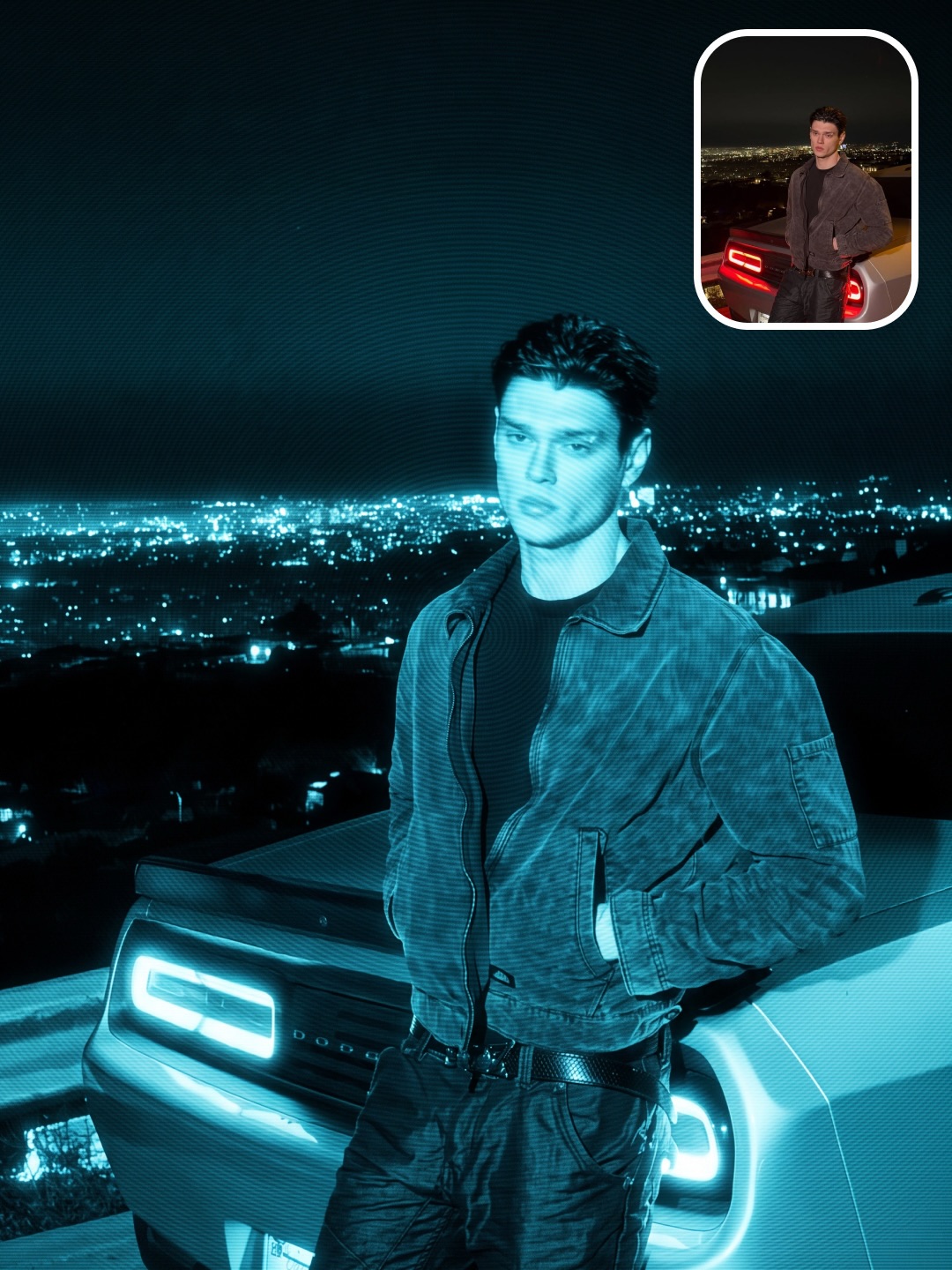
Supplied creator reference—not a new Wiggly-generated result.
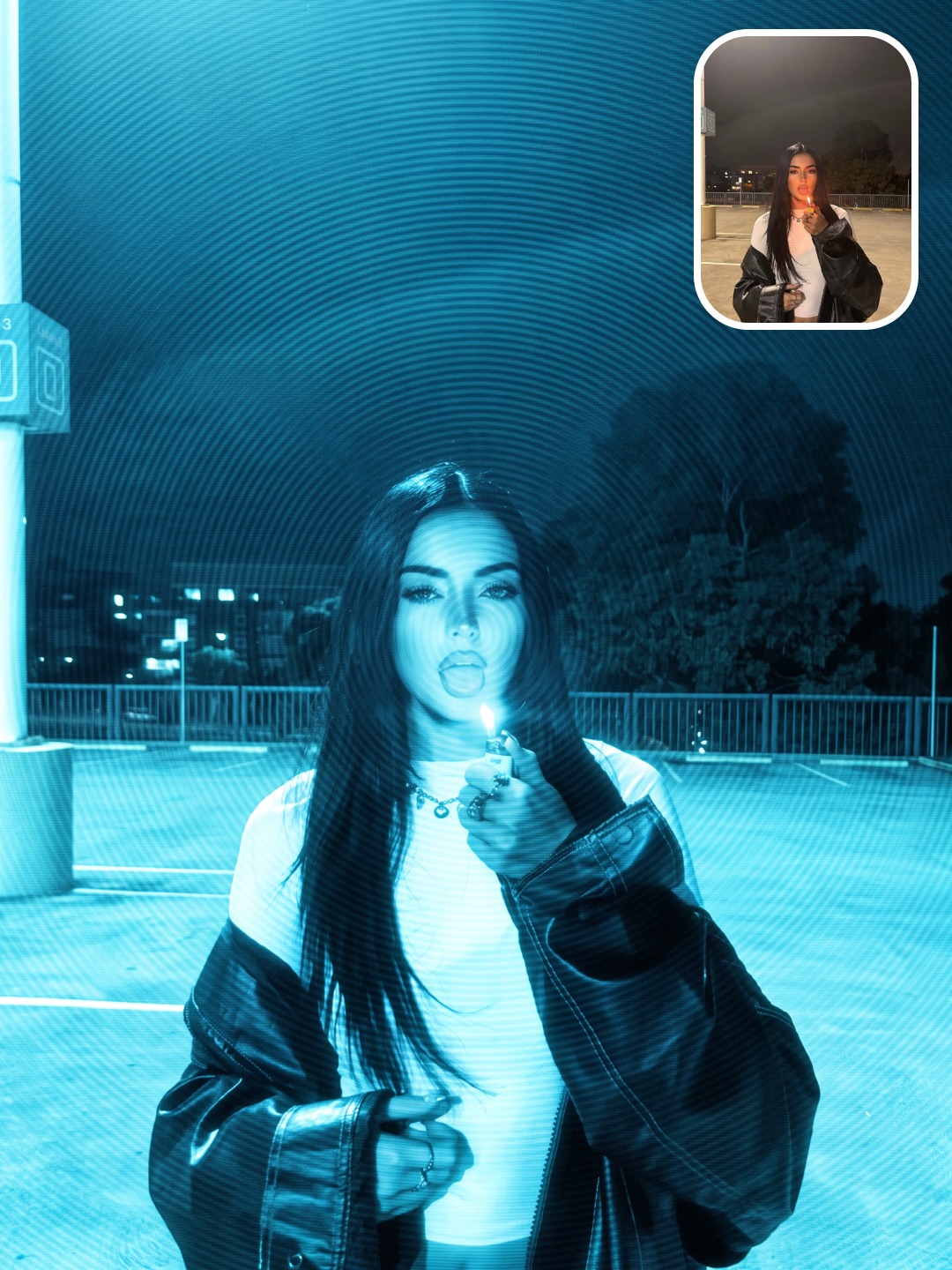
Supplied creator reference—not a new Wiggly-generated result.
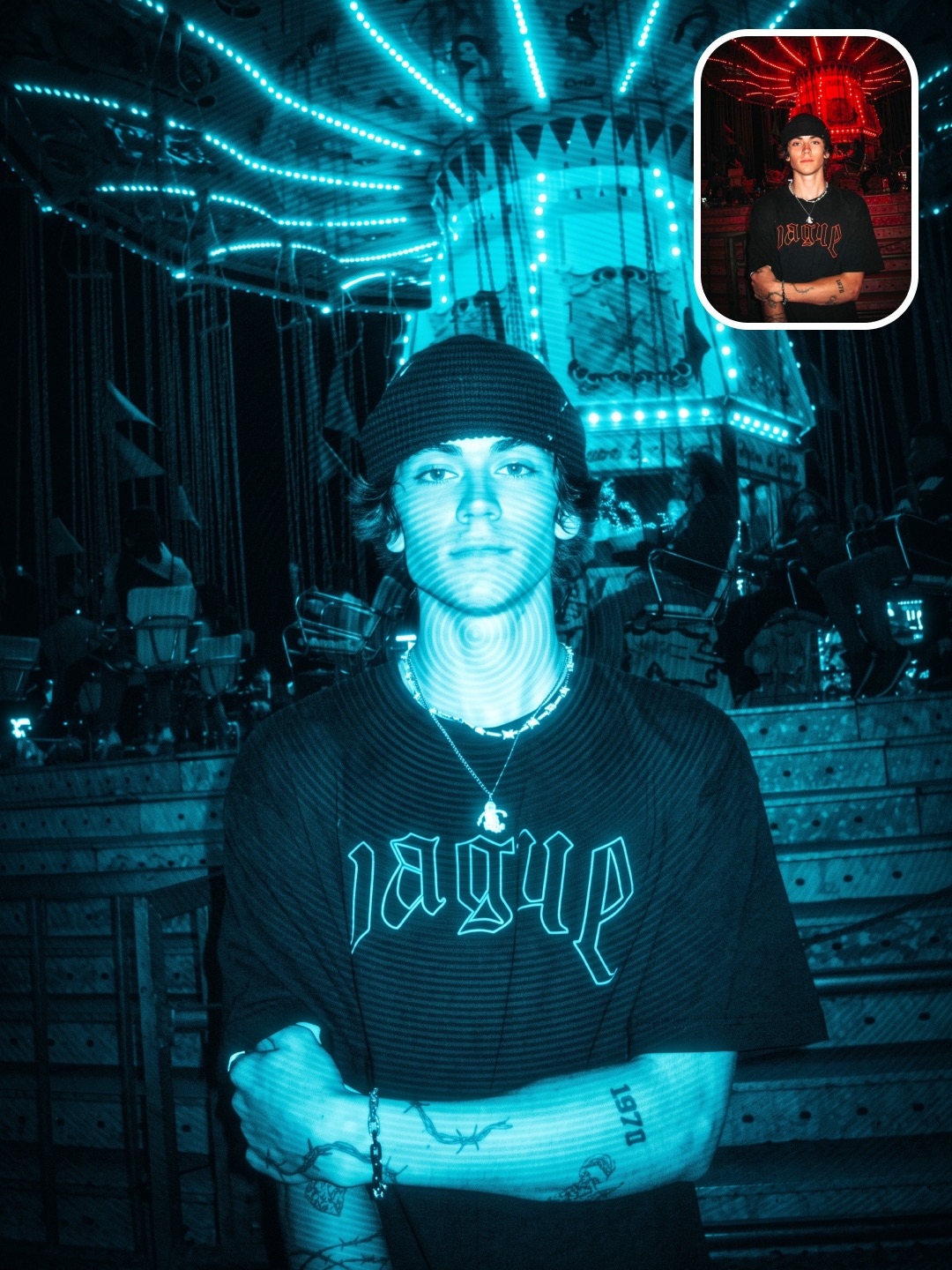
Supplied creator reference—not a new Wiggly-generated result.
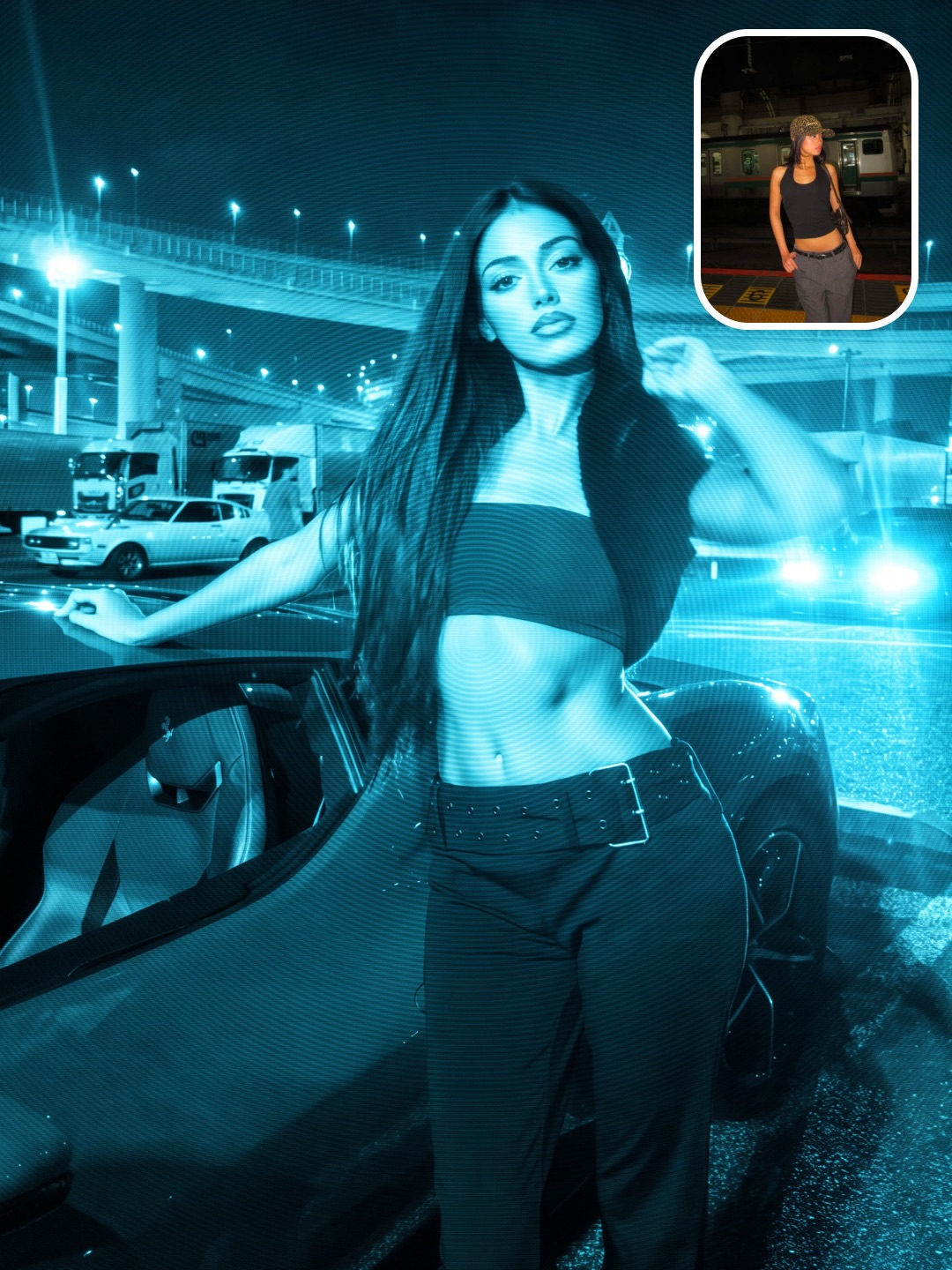
Supplied creator reference—not a new Wiggly-generated result.
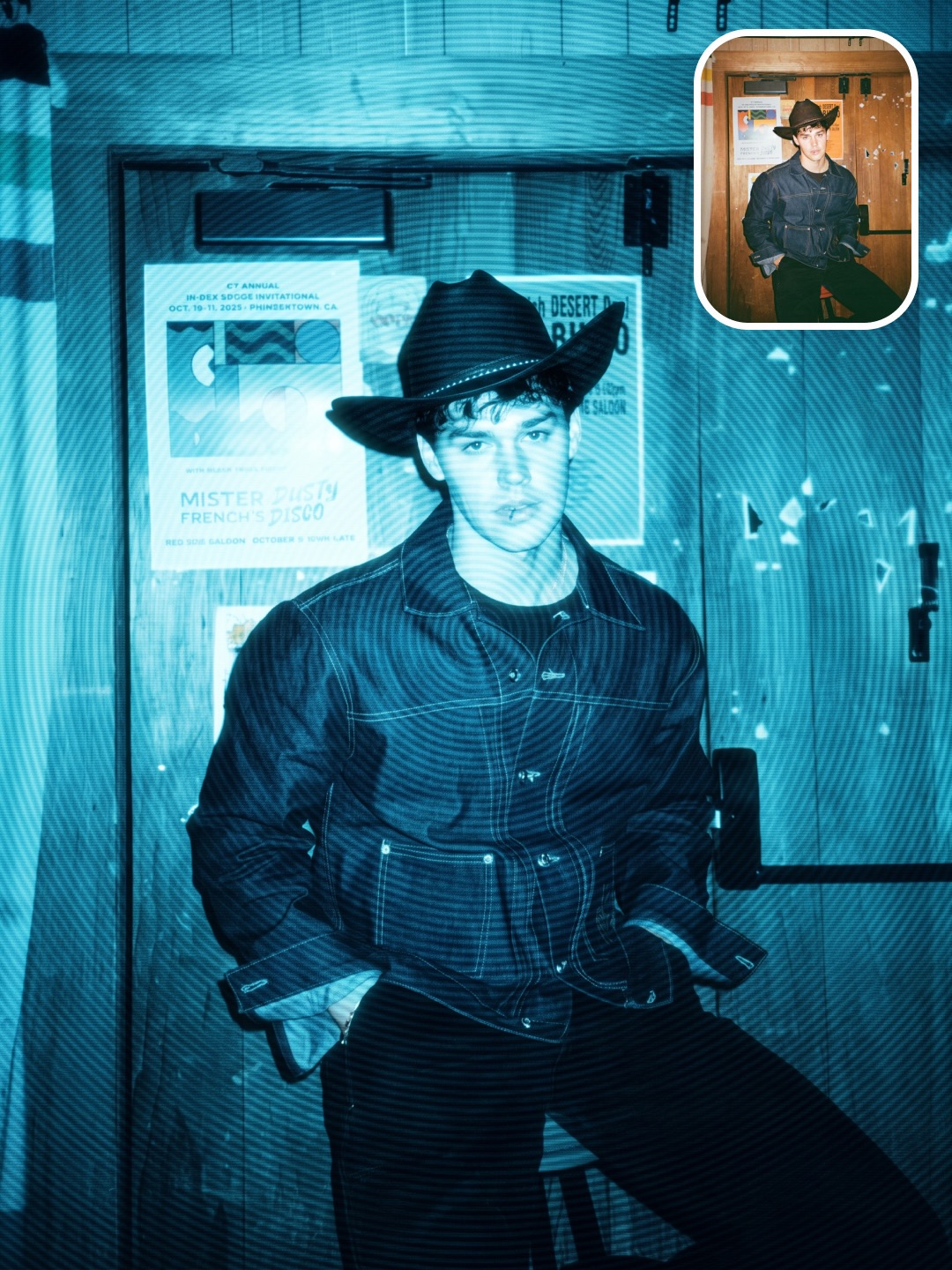
Supplied creator reference—not a new Wiggly-generated result.
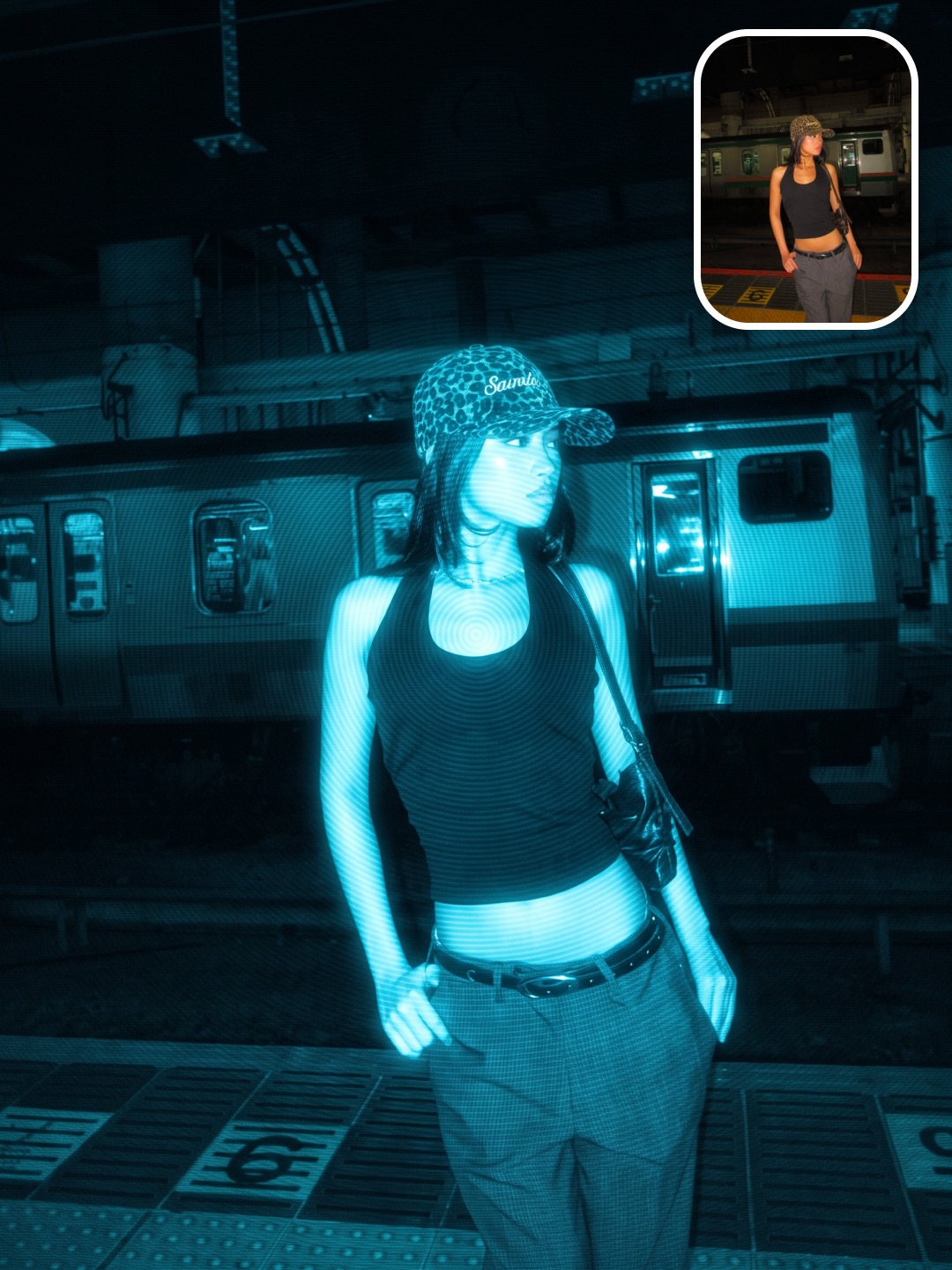
Supplied creator reference—not a new Wiggly-generated result.
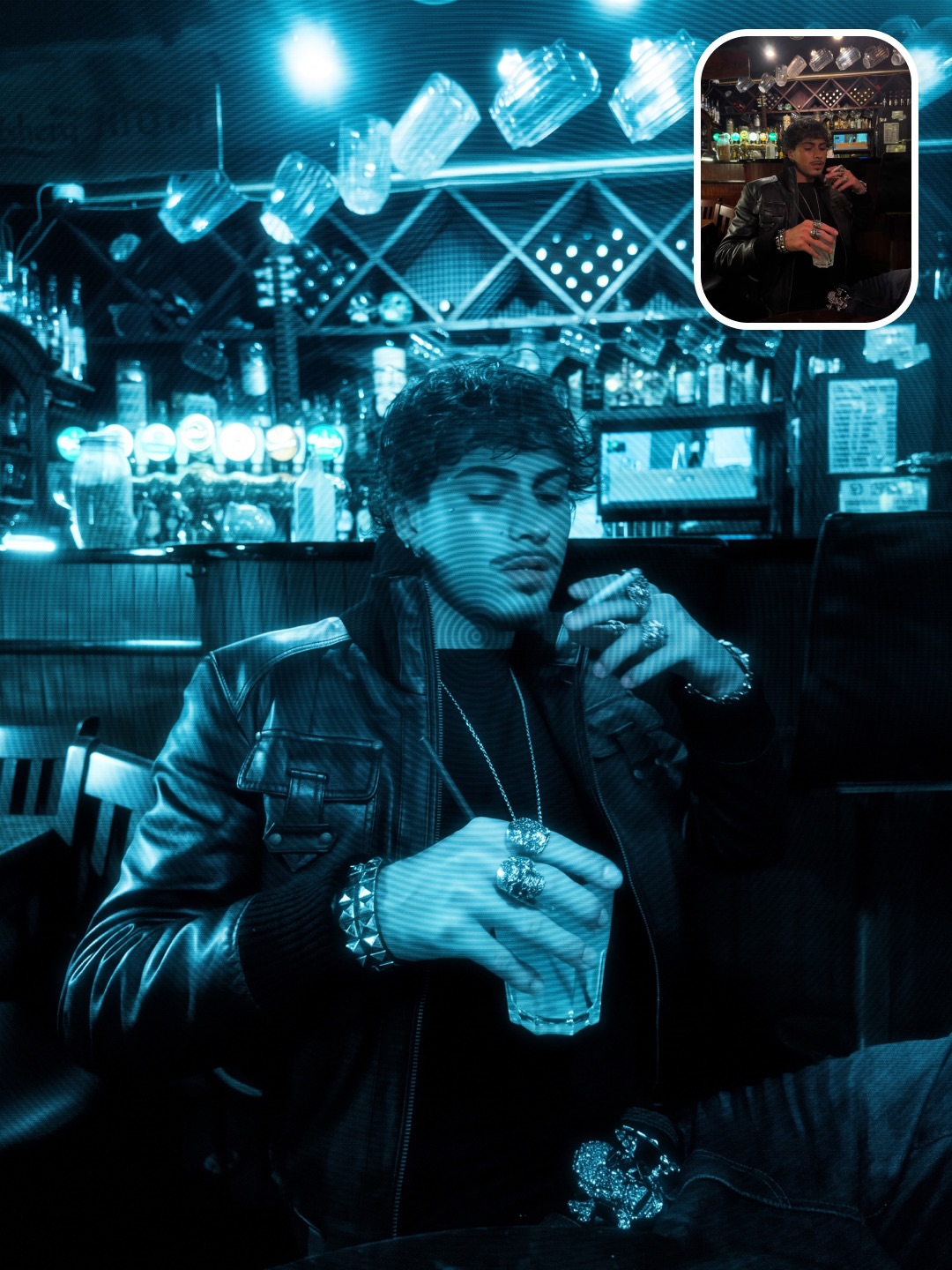
Supplied creator reference—not a new Wiggly-generated result.
Examples
7 saved examples for this recipe—not 7 separate Repos. Each example keeps its original version and provenance.
From input to output
From the published pipeline.json. The agent follows the packaged runtime and its approval gates.
Step 01
One run pinned to the portrait, exact gathered prompt, and selected model route.
Step 02
The portrait and prompt contract checked locally.
Step 03 · approval · provider
One Blue Phosphor transform from one approved prediction.
Step 04 · approval
Automatic file checks plus an actual visual review.
Proof & quality
Judge exact source preservation, luminous cyan-blue monochrome color, fine scanlines, soft phosphor bloom, face-centered interference rings, and an edge-to-edge photographic finish.
The delivered Google Doc supplied the exact Nano Banana Pro prompt and negative prompt. The Instagram carousel supplied seven native before-and-after examples.
Each native example already displays its matching original photo in the top-right corner. The same originals are also packaged as separate reference crops for agent use.
Saved reference
Saved reference
These are the acceptance criteria in quality.json—not a claim that every pictured example passed the current version. Inspect each new output before finalizing.
Open the package
Actual files from the published v1.0.0 package. Expand any file to inspect the instructions, requirements, or evidence before sending the Repo to your agent.
# Wiggly Blue Phosphor Filter Format

This runnable Repo preserves the exact prompt, negative prompt, guide, seven
native SKAI examples, and their original-photo reference insets. It uses the
shared Wiggly image runner so validation, paid approval, retry caps, and visual
finalization stay explicit.

Run from `v3`:

```bash
npm install
npm run format:skai-image -- check --format=blue-phosphor
npm run format:skai-image -- smoke --format=blue-phosphor
npm run format:skai-image -- init --format=blue-phosphor --run=my-photo --input=/absolute/path/to/photo.jpg
npm run format:skai-image -- validate --format=blue-phosphor --run=my-photo
npm run format:skai-image -- estimate --format=blue-phosphor --run=my-photo
```

Generation requires `REPLICATE_API_TOKEN` and explicit approval:

```bash
npm run format:skai-image -- render --format=blue-phosphor --run=my-photo --approve-paid
```

No Replicate proof call was made while packaging this Repo.

Model routes:

- Economy: `google/nano-banana-2-lite`
- Default: `google/nano-banana-2`
- Premium and creator source: `google/nano-banana-pro`
---
name: wiggly-blue-phosphor
description: Apply the exact gathered SKAI Blue Phosphor Filter to one photograph while preserving the source image.
---

# Blue Phosphor Filter

Use the packaged runner and exact prompt. Do not call Replicate separately or
create another render path.

Ask one short question:

> Which photo should I apply the Blue Phosphor Filter to?

Then run:

```bash
npm run format:skai-image -- init --format=blue-phosphor --run=<id> --input=<absolute-image-path>
npm run format:skai-image -- validate --format=blue-phosphor --run=<id>
npm run format:skai-image -- estimate --format=blue-phosphor --run=<id>
npm run format:skai-image -- render --format=blue-phosphor --run=<id> --approve-paid
npm run format:skai-image -- inspect --format=blue-phosphor --run=<id>
npm run format:skai-image -- inspect --format=blue-phosphor --run=<id> --visual-pass --review-notes="<specific observations>"
npm run format:skai-image -- finalize --format=blue-phosphor --run=<id> --approve-final
```

Hard rules:

- Preserve the source identity, clothing, pose, composition, lighting, and background.
- Keep the exact gathered prompt and negative prompt unless the user explicitly requests a change.
- Use Nano Banana 2 by default, Lite for economy, or Pro for premium and creator-source fidelity.
- Validate before spending and never render without `--approve-paid`.
- Persist and resume the prediction ID.
- Never exceed three attempts.
- View the output and record specific visual-review notes before finalizing.
- Never print, store, or commit `REPLICATE_API_TOKEN`.
{
  "runtime": {
    "node": ">=22",
    "commands": ["npm"]
  },
  "providers": [
    {
      "name": "Replicate",
      "models": [
        "google/nano-banana-2-lite",
        "google/nano-banana-2",
        "google/nano-banana-pro"
      ]
    }
  ],
  "environment": [
    {
      "name": "REPLICATE_API_TOKEN",
      "secret": true,
      "requiredFor": ["render", "resume"]
    }
  ],
  "notes": [
    "All smoke and validation commands are local.",
    "No proof generation was purchased for this package.",
    "One render attempt is one paid prediction.",
    "Paid generation requires explicit approval and is capped at three attempts."
  ]
}
{
  "required": [
    {
      "id": "portrait",
      "type": "image",
      "formats": ["jpg", "png", "webp"],
      "minimumWidth": 512,
      "minimumHeight": 512,
      "maximumBytes": 26214400
    }
  ],
  "question": "Which photo should I apply the Blue Phosphor Filter to?",
  "defaults": {
    "model": "nano-banana-2",
    "aspectRatio": "3:4",
    "outputCount": 1
  },
  "modelRoutes": {
    "economy": "google/nano-banana-2-lite",
    "default": "google/nano-banana-2",
    "premium": "google/nano-banana-pro",
    "source": "google/nano-banana-pro"
  }
}
{
  "progress": "Prepare -> Validate -> Transform -> Inspect",
  "attemptCap": 3,
  "stages": [
    {
      "id": "prepare",
      "output": "One run pinned to the portrait, exact gathered prompt, and selected model route.",
      "paid": false,
      "approvalRequired": false
    },
    {
      "id": "validate",
      "output": "The portrait and prompt contract checked locally.",
      "paid": false,
      "approvalRequired": false
    },
    {
      "id": "transform",
      "output": "One Blue Phosphor transform from one approved prediction.",
      "paid": true,
      "approvalRequired": true
    },
    {
      "id": "inspect",
      "output": "Automatic file checks plus an actual visual review.",
      "paid": false,
      "approvalRequired": true
    }
  ]
}
{
  "sourceReference": {
    "creator": "@skaigenerated",
    "postUrl": "https://www.instagram.com/skaigenerated/p/Da5ngwyimYQ/",
    "resourceUrl": "https://docs.google.com/document/d/1RHT3MDjm1a7nI-ieQdN6YjOF-bYUGT3GEJrvzX7ajIM/edit",
    "guide": "assets/source/guide.pdf",
    "cover": "assets/source/cover.jpg",
    "referenceInset": "assets/source/car-headlights-reference.jpg",
    "verification": "The delivered Google Doc supplied the exact Nano Banana Pro prompt and negative prompt. The Instagram carousel supplied seven native before-and-after examples.",
    "referenceNote": "Each native example already displays its matching original photo in the top-right corner. The same originals are also packaged as separate reference crops for agent use."
  },
  "examples": [
    { "id": "car-headlights", "path": "assets/source/car-headlights.jpg", "referencePath": "assets/source/car-headlights-reference.jpg" },
    { "id": "terrace", "path": "assets/source/terrace.jpg", "referencePath": "assets/source/terrace-reference.jpg" },
    { "id": "neon-stage", "path": "assets/source/neon-stage.jpg", "referencePath": "assets/source/neon-stage-reference.jpg" },
    { "id": "night-car", "path": "assets/source/night-car.jpg", "referencePath": "assets/source/night-car-reference.jpg" },
    { "id": "cowboy-market", "path": "assets/source/cowboy-market.jpg", "referencePath": "assets/source/cowboy-market-reference.jpg" },
    { "id": "garage", "path": "assets/source/garage.jpg", "referencePath": "assets/source/garage-reference.jpg" },
    { "id": "lounge", "path": "assets/source/lounge.jpg", "referencePath": "assets/source/lounge-reference.jpg" }
  ]
}
{
  "automatic": [
    "Exactly 1 decodable JPG, JPEG, PNG, or WebP output",
    "At least 640x800 pixels",
    "Aspect ratio matches the selected route within 0.02",
    "At least 50 KB"
  ],
  "visual": [
    "The source identity, hairstyle, clothing, pose, composition, lighting, and background remain unchanged",
    "The photograph is luminous electric cyan-blue monochrome from edge to edge",
    "Fine horizontal analog scanlines blend naturally across the full image",
    "Soft phosphor grain, bloom, halation, luminance noise, and rich blue shadows feel organic",
    "Concentric optical interference rings radiate from the subject's face",
    "There is no border, rounded frame, television, monitor, bezel, UI, logo, or watermark"
  ],
  "finalization": {
    "automaticPassRequired": true,
    "visualPassRequired": true,
    "reviewNotesRequired": true,
    "explicitApprovalFlag": "--approve-final"
  }
}
{
  "purpose": "Judge exact source preservation, luminous cyan-blue monochrome color, fine scanlines, soft phosphor bloom, face-centered interference rings, and an edge-to-edge photographic finish.",
  "examples": [
    {
      "id": "car-headlights",
      "title": "Headlights in Phosphor",
      "imagePath": "assets/source/car-headlights.jpg",
      "referencePath": "assets/source/car-headlights-reference.jpg",
      "model": "Nano Banana Pro",
      "whyItWorks": [
        "The source face, dark jacket, car, and city composition stay intact",
        "Headlights bloom naturally into the cyan night",
        "Fine scanlines and face-centered rings remain visible without looking pasted on"
      ]
    },
    {
      "id": "terrace",
      "title": "City Terrace in Cyan",
      "imagePath": "assets/source/terrace.jpg",
      "referencePath": "assets/source/terrace-reference.jpg",
      "model": "Nano Banana Pro",
      "whyItWorks": [
        "The original pose and leather jacket remain unchanged",
        "Bright skin and white clothing emit a controlled phosphor glow",
        "The skyline retains realistic depth under the monochrome grade"
      ]
    },
    {
      "id": "neon-stage",
      "title": "Neon Stage Interference",
      "imagePath": "assets/source/neon-stage.jpg",
      "referencePath": "assets/source/neon-stage-reference.jpg",
      "model": "Nano Banana Pro",
      "whyItWorks": [
        "The original red stage becomes a coherent cyan-blue environment",
        "Tattoos, jewelry, and clothing remain readable",
        "Optical rings radiate from the face through the bright architecture"
      ]
    },
    {
      "id": "night-car",
      "title": "Airport Lights Bloom",
      "imagePath": "assets/source/night-car.jpg",
      "referencePath": "assets/source/night-car-reference.jpg",
      "model": "Nano Banana Pro",
      "whyItWorks": [
        "The source stance and crop survive exactly",
        "Vehicle lights glow without flattening the background",
        "Analog softness supports the early-2000s digital mood"
      ]
    },
    {
      "id": "cowboy-market",
      "title": "Cowboy Under Scanlines",
      "imagePath": "assets/source/cowboy-market.jpg",
      "referencePath": "assets/source/cowboy-market-reference.jpg",
      "model": "Nano Banana Pro",
      "whyItWorks": [
        "The hat, jacket, posture, and store remain faithful to the source",
        "Horizontal lines read cleanly across bright and dark areas",
        "The cyan highlight rolloff feels self-illuminated rather than filtered"
      ]
    },
    {
      "id": "garage",
      "title": "Garage Phosphor",
      "imagePath": "assets/source/garage.jpg",
      "referencePath": "assets/source/garage-reference.jpg",
      "model": "Nano Banana Pro",
      "whyItWorks": [
        "The subject's face, cap, outfit, and stance remain recognizable",
        "Deep shadows carry texture instead of collapsing into black",
        "The edge-to-edge image avoids a fake monitor or bezel"
      ]
    },
    {
      "id": "lounge",
      "title": "Blue Lounge Bloom",
      "imagePath": "assets/source/lounge.jpg",
      "referencePath": "assets/source/lounge-reference.jpg",
      "model": "Nano Banana Pro",
      "whyItWorks": [
        "The seated pose, drink, jewelry, and lounge setting survive",
        "Face-centered rings remain subtle against a busy background",
        "Cyan bloom and analog grain create a cinematic finish"
      ]
    }
  ]
}
{
  "id": "blue-phosphor",
  "version": "1.0.0",
  "title": "Blue Phosphor Filter",
  "description": "Turn one photograph into a luminous cyan-blue monochrome image with analog scanlines, soft phosphor bloom, and concentric optical interference.",
  "status": "agent-ready",
  "owner": "Wiggly Studio",
  "source": {
    "creator": "@skaigenerated",
    "postUrl": "https://www.instagram.com/skaigenerated/p/Da5ngwyimYQ/",
    "resourceUrl": "https://docs.google.com/document/d/1RHT3MDjm1a7nI-ieQdN6YjOF-bYUGT3GEJrvzX7ajIM/edit",
    "ctaKeyword": "AI",
    "modelShown": "Nano Banana Pro"
  },
  "outputs": [
    "1 inspected Blue Phosphor image",
    "state.json with model and prediction provenance",
    "quality-report.json with automatic and visual inspection"
  ]
}
{
  "name": "wiggly-blue-phosphor-format-kit",
  "private": true,
  "version": "1.0.0",
  "type": "module",
  "engines": {
    "node": ">=22"
  },
  "scripts": {
    "check:kit": "node kit-smoke.mjs",
    "format:skai-image": "tsx scripts/skai-image-format.ts",
    "test": "tsx tests/skai-image-format-runner.test.ts --format=blue-phosphor && node kit-smoke.mjs"
  },
  "dependencies": {
    "image-size": "2.0.2",
    "replicate": "1.4.0",
    "tsx": "4.20.6"
  }
}
{
  "slug": "blue-phosphor",
  "version": "1.0.0",
  "promptPath": "prompts/transform.txt",
  "input": {
    "mode": "image",
    "formats": ["jpg", "png", "webp"],
    "minimumWidth": 512,
    "minimumHeight": 512,
    "maximumBytes": 26214400
  },
  "defaultModel": "nano-banana-2",
  "modelRoutes": {
    "nano-banana-2-lite": {
      "label": "Nano Banana 2 Lite",
      "lane": "economy",
      "model": "google/nano-banana-2-lite",
      "family": "nano-banana",
      "aspectRatio": "3:4",
      "outputFormat": "jpg"
    },
    "nano-banana-2": {
      "label": "Nano Banana 2",
      "lane": "default",
      "model": "google/nano-banana-2",
      "family": "nano-banana",
      "aspectRatio": "3:4",
      "outputFormat": "jpg",
      "resolution": "1K"
    },
    "nano-banana-pro": {
      "label": "Nano Banana Pro",
      "lane": "premium",
      "model": "google/nano-banana-pro",
      "family": "nano-banana",
      "aspectRatio": "3:4",
      "outputFormat": "jpg",
      "resolution": "1K"
    },
    "nano-banana-pro-source": {
      "label": "Nano Banana Pro (creator source)",
      "lane": "source model",
      "model": "google/nano-banana-pro",
      "family": "nano-banana",
      "aspectRatio": "3:4",
      "outputFormat": "jpg",
      "resolution": "1K"
    }
  },
  "expectedOutputs": 1,
  "maximumAttempts": 3,
  "smokeInputPath": "assets/source/car-headlights-reference.jpg",
  "smokeExamplePath": "assets/source/car-headlights.jpg",
  "minimumOutputWidth": 640,
  "minimumOutputHeight": 800,
  "minimumOutputBytes": 51200,
  "manualReview": [
    "source identity, clothing, pose, lighting, and background stay unchanged",
    "luminous electric cyan-blue monochrome finish",
    "fine horizontal analog scanlines across the full photograph",
    "soft phosphor bloom, grain, halation, and rich blue shadow",
    "concentric optical interference centered on the face",
    "edge-to-edge photograph with no screen, bezel, border, logo, or UI"
  ]
}
Run it with a coding agent
The agent reads this version’s instructions, checks the requirements, and walks you through the approved workflow. Review the inputs and estimate before starting.
Typical run
One Replicate image charge and usually 2-4 min
You provide
One JPEG, PNG, or WebP photograph at least 512px on both axes · A Replicate API token only when generation is approved
Output
One inspected 3:4 Blue Phosphor image plus prediction and quality provenance